Blog
- Android UI Automation with FindNode: Automate UI Elements Without Fixed Coordinates
- Android Automation: How to Automate Real Android Devices from PC
- Scrcpy Multiple Devices: How to Control Multiple Android Devices on Windows
- Deploy APK to Multiple Android Devices: Batch Installation Guide
- Vysor Alternative for Windows: Control Android with Keyboard and Mouse
- Screen Mirroring Android to PC: USB and Wi-Fi Methods
- Best scrcpy Alternatives for Windows: 5 Options Compared
- Best File Transfer Software from Android to PC: Which Method Should You Use?
- How to Control Android with Keyboard and Mouse from a PC
- How to Test Mobile Apps on Multiple Devices Efficiently
- How to Manage Multiple Devices Efficiently
- Local vs Cloud Device Farm: Which Is Better
- Multi-Device Setup for Live Streaming Workflows
- How to Use an Android Device Farm Efficiently
- Android Screen Mirroring with Control: What You Need to Know
- How to Mirror Multiple Android Devices to PC
- Best Android Screen Mirroring to PC: Full Guide
- How to Control Multiple Demo Devices for Retail and Exhibitions
- How to Manage Multiple Devices for Social Media Workflows
- How to Use Multiple Devices for Content Creation
- Best Multi-Device Workflow Tools for Efficient Operations
- Mobile Device Management vs Device Control Software: What’s the Difference
- How to Control Multiple Android Devices from One PC
- Android Device Farm: How to Build and Control Multiple Android Devices
- Control Android Phone from PC | Mirror and Operate Android on Windows
Best scrcpy Alternatives for Windows: 5 Options Compared
scrcpy is one of the best-known tools for mirroring and controlling Android from a computer. It is free, open source, lightweight, and supports keyboard and mouse control of real Android devices. However, users often search for a scrcpy alternative because they want a graphical interface, stronger multi-device management, easier file operations, Windows integration, or built-in automation.
There is no single best replacement for every user. The right choice depends on why scrcpy no longer fits your workflow.
scrcpy Alternatives at a Glance
| Tool | Best For | GUI | Android Control | Multi-Device Focus |
|---|---|---|---|---|
| Total Control | Windows device management and automation | Yes | Yes | Strong |
| Vysor | Simple desktop Android control | Yes | Yes | Limited |
| AirDroid Cast | Screen casting and presentations | Yes | Depends on connection mode | Moderate |
| Microsoft Phone Link | Windows phone integration | Yes | Device dependent | Limited |
| scrcpy GUI projects | Users who like scrcpy but want a GUI | Yes | Yes | Varies |
1. Total Control — Best for Multi-Device Android Control on Windows
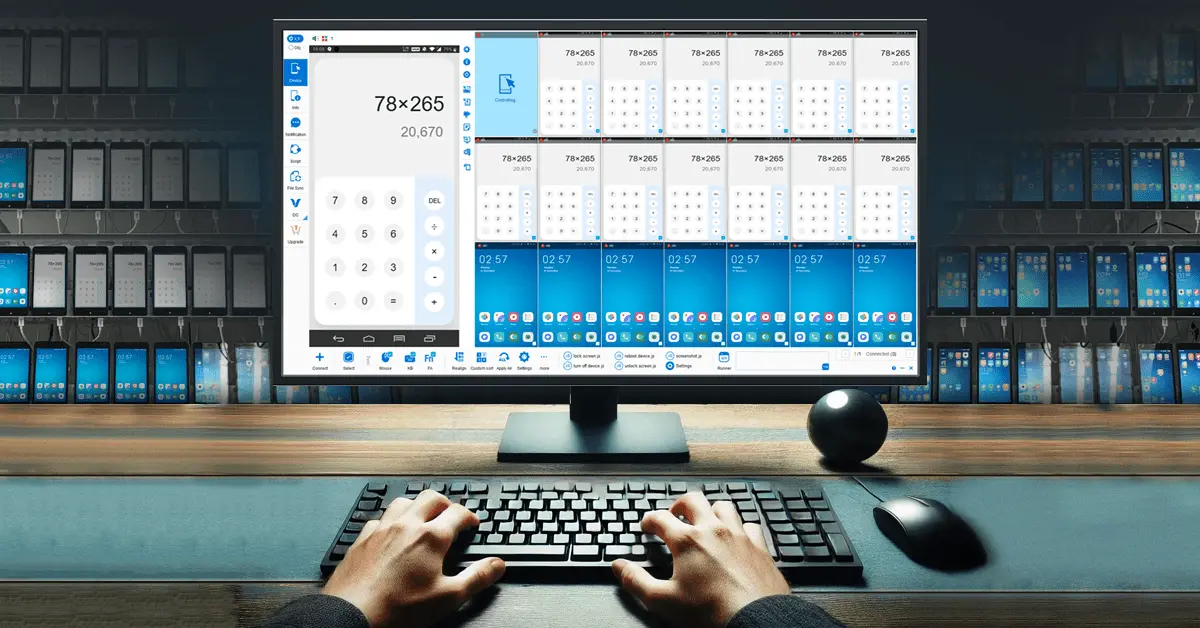
Total Control is a Windows application for mirroring, controlling, and managing physical Android devices. Unlike tools focused mainly on displaying one Android screen, Total Control also provides a graphical environment for multi-device operation, synchronization, file management, clipboard workflows, and automation.
Why Choose Total Control Instead of scrcpy?
Total Control is particularly relevant if your main reason for searching for a scrcpy alternative is that you need more management features around the connected Android devices.
Depending on the workflow, you can use:
- Mouse control and keyboard input.
- Android screen mirroring.
- Clipboard operations.
- File transfer and APK handling.
- Multiple Android device windows.
- Multi-device input synchronization.
- Automation features and APIs.
Best For
Total Control is most relevant to:
- QA engineers.
- Android developers.
- Local device labs.
- Multi-device operations.
- Businesses managing Android devices locally.
- Users who prefer a Windows GUI to command-line configuration.
Limitations
Total Control is Windows-focused. If you need the same Android control tool on Linux and macOS, scrcpy has an important advantage because of its cross-platform design. scrcpy is also open source, while Total Control includes commercial editions for broader functionality.
2. Vysor — Best for Simple GUI-Based Android Control
Vysor is a familiar option for users who want to view and control Android from a desktop application without spending time managing command-line options. Its main appeal is an accessible graphical workflow for normal screen control.
Typical use cases include:
- Viewing an Android screen on the desktop.
- Clicking Android applications with a mouse.
- Typing with a computer keyboard.
- Basic screen control.
- Wireless workflows where supported.
Best For
Choose this type of solution if your main objection to scrcpy is the learning curve and you primarily need to work with one Android device through a GUI.
Limitations
If you need larger-scale Android device management, synchronization, or automation, compare those features separately instead of choosing a tool only because it has a simple mirroring interface.
3. AirDroid Cast — Best for Casting and Presentations
AirDroid Cast focuses strongly on screen casting and is suited to scenarios where sharing or presenting an Android screen is more important than building a local device-management environment.
Common use cases include:
- Presentations.
- Classroom demonstrations.
- Screen sharing.
- Remote collaboration.
- Showing a phone screen on a PC or Mac.
Best For
Choose AirDroid Cast when your primary requirement is casting across different connection scenarios rather than controlling many locally connected Android devices as one managed group.
4. Microsoft Phone Link — Best for Windows Integration
Microsoft Phone Link is worth considering if you mainly want your Android phone integrated into the Windows desktop. Depending on the phone and Windows configuration, Phone Link can provide access to notifications, messages, calls, files, photos, and selected phone-screen features.
Why Choose Phone Link?
It is a natural option for users who want Android functions inside their normal Windows workflow and do not need a dedicated Android testing or multi-device management environment.
Limitations
Feature availability varies by Android model and Windows configuration, so it is less predictable as a universal scrcpy replacement when full device control is the main requirement.
5. scrcpy GUI Projects — Best for Users Who Still Want scrcpy
Sometimes the best alternative is not a completely different technology. Community projects can add graphical interfaces and workflow improvements around scrcpy-style Android control.
These tools can be attractive if you want:
- A familiar scrcpy-based workflow.
- A graphical configuration panel.
- Easier switching between command options.
- Saved configurations.
- Multi-device launch controls.
Community projects vary in maintenance, stability, and feature coverage. Check current development activity before relying on one for a production environment.
scrcpy vs Total Control
| Requirement | scrcpy | Total Control |
|---|---|---|
| Free and open source | Yes | No |
| Windows | Yes | Yes |
| macOS | Yes | No |
| Linux | Yes | No |
| Graphical device-management interface | Limited | Yes |
| Keyboard and mouse control | Yes | Yes |
| Screen mirroring | Yes | Yes |
| Local USB connection | Yes | Yes |
| Local network connection | Yes | Yes |
| Multi-device management | Possible | Designed for it |
| Device synchronization workflow | Technical setup | Built into multi-device workflows |
| Automation | Command and script oriented | Integrated automation options |
scrcpy is best understood as a lightweight and highly configurable mirroring and control tool. Total Control is better understood as a broader Windows environment for controlling and managing Android devices.
Which scrcpy Alternative Should You Choose?
Choose Total Control if:
You primarily use Windows and need to control multiple real Android devices, synchronize actions, transfer files, or build testing and automation workflows.
Choose Vysor if:
You mainly want a straightforward graphical interface for controlling a phone.
Choose AirDroid Cast if:
Your main goal is presenting, casting, or sharing an Android screen.
Choose Phone Link if:
You want Android integrated into your normal Windows workflow and do not need advanced device-management features.
Choose a scrcpy GUI if:
You already like how scrcpy works but want to avoid manually managing command-line parameters.
Stay with scrcpy if:
You want a free, open-source, cross-platform tool and are comfortable configuring the features you need.
What to Look for in an Alternative to scrcpy
Keyboard and Mouse Control
Some screen-sharing applications only mirror the display. Confirm that the software can also send input back to Android if interactive control is required.
USB and Wireless Connections
USB is useful for predictable local connections. Wireless operation is more convenient but may depend on local network conditions and the setup method used by the software.
Multi-Device Support
Opening several device windows is not the same as managing and synchronizing operations across many devices. If multi-device control matters, compare organization, synchronization, and failure-handling features.
File Transfer and Automation
Developers and QA teams should check whether the tool supports file operations, scripting, APIs, UI element identification, repeatable actions, and synchronized multi-device workflows.
FAQ
What is the best scrcpy alternative for Windows?
The best option depends on your goal. Total Control is suitable for Windows users who need a GUI, multi-device control, file operations, synchronization, and automation, while simpler tools may be better for basic screen control.
Is there a scrcpy alternative with a GUI?
Yes. Commercial Android control software and community scrcpy GUI projects provide graphical interfaces for mirroring and controlling Android devices.
Is there a scrcpy alternative for controlling multiple Android devices?
Yes. Some Android management tools are designed specifically for multi-device control, synchronization, testing, and automation rather than simply opening several mirroring windows.
Should I replace scrcpy if it already works?
Not necessarily. scrcpy remains a strong choice for lightweight, open-source, cross-platform Android control. Consider another tool only when it solves a specific workflow problem more efficiently.
Can scrcpy alternatives work without an emulator?
Yes. Tools in this category can mirror and control real Android devices directly, so an Android emulator is not required.
Do scrcpy alternatives require root?
Many do not require root access. Exact connection and authorization requirements vary by tool and Android device.
If your reason for replacing scrcpy is the need for a Windows GUI, multi-device control, synchronization, file management, and automation, compare those requirements with Total Control – Control Android from PC before choosing your next Android control tool.