How to Call a Custom Endpoint via REST API
Please refer to Call JS API through RestAPI for more information.
Introduction:
Total Control automatically generates restExt.js in the script directory. You can use restDeviceRegister() to map an HTTP URL to a JS function (JS API / Device API).
This allows external systems to trigger script capabilities via REST API calls (for example: retrieving the foreground app, performing automation steps, etc.).
This example demonstrates the most common workflow:
- Register the interface in restExt.js: GET /getapp → calls device.getForegroundApp()
- External script logs in to obtain a token
- Obtain the device ID
- Call the custom endpoint /getapp and retrieve the returned value
Before Running:
- Download and install Total Control 11.0 (Update 20) or later (Download)
-
Connect Android devices
(supports USB connection
or TCP connection)
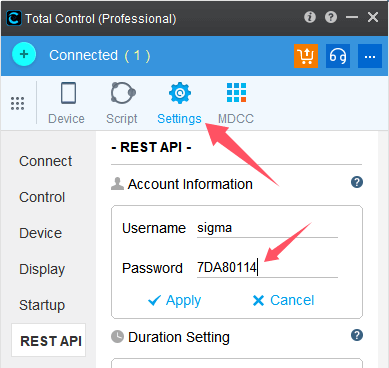
- Open Main Panel → Settings to find the REST username and password (in the example,
sigma:7DA80114 should be replaced with your actual credentials)
- Register a custom URL in restExt.js:
Open the default script directory and append the following code to restExt.js:
/**
 * Map GET /getapp to JS API: device.getForegroundApp()
 */
restDeviceRegister(
	"myGetApp",          // Custom name (for identification only)
	"getapp",            // URL path: /devices/{id}/getapp
	tcConst.rest.GET,    // GET method
	null,                // Parameter name: null for GET
	doGetForegroundApp,  // Callback function
	{ multiple: false }  // Single device
);

function doGetForegroundApp(url, method, device, opt, params) {
	// Call your desired JS API here
	var ret = device.getForegroundApp();
	return ret; // Return value will be sent as the HTTP response
}
- Open the Script Terminal (Main Panel → Scripts → Terminal) and copy the example code directly into the terminal to execute.
// External Call (Login → Get Device → Call Custom Endpoint)
var { request } = require("ringo/httpclient");
var base64 = require("ringo/base64");

// 1) Log in to obtain a token (replace the username and password with your own)
var userpass = base64.encode("sigma:7DA80114");
var loginResp = request({
	method: "GET",
	url: "http://localhost:8090/TotalControl/v2/login",
	headers: { Authorization: userpass }
});

var token = JSON.parse(loginResp.content).value.token;
print("// token = " + token);

// 2) Get the primary device ID
var devResp = request({
	method: "GET",
	url: "http://localhost:8090/TotalControl/v2/devices/main?token=" + token
});

var deviceId = JSON.parse(devResp.content).id;
print("// deviceId = " + deviceId);

// 3) Call the custom URL: GET /getapp
var ret = request({
	method: "GET",
	url: "http://localhost:8090/TotalControl/v2/devices/" + deviceId + "/getapp",
	data: { token: token }
});

print(ret.content);
Execution Result
// token = GG1B73lWnl2cScfx
// deviceId = device@1449140439
com.example.someapp
The last line returns the value of device.getForegroundApp() (the current foreground app package name/identifier)