Search Devices by Tag
Please refer to Device.searchObject for more information.
Introduction:
This example demonstrates how to use the Total Control scripting API to quickly locate connected devices by their tags and launch an app on those devices.
Before Running:
-
Download and install Total Control 11.0 (Update 20) or later
(Download)
- Connect two Android devices
(supports USB connection
or TCP connection)
- Add tags to the devices in the user interface. Here, we configure tags for two devices: each device has a unique tag, and both share a common tag, TagGroup1
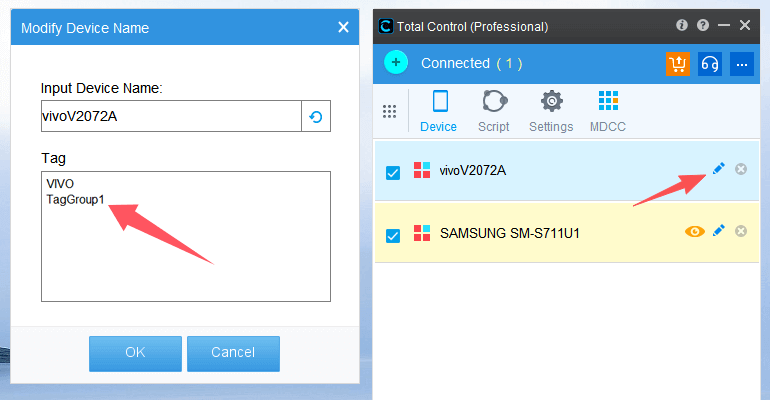
- Save the example code as a .js file (for example, TestTag.js) and place it in the Total Control default script directory
- Open the Script Terminal (Main Panel → Scripts → Script Terminal), then execute:
>> sigmaLoad("TestTag.js");
// Import the search object
var search = require('sigma/device');
// Check whether the import was successful
if (search) {
	// Call search.searchTag() to search for a single tag using a string parameter
	var searchdevice = search.searchTag('TagGroup1');
	if (searchdevice ) {
		// Search successful, print the searchDevice object
		print('find device :' + searchdevice );
		// Use the searchDevice object to run the launch App command
		if (searchdevice.length == 1) {
			var result = searchdevice[0].runApp('com.sigma_rt.sigmatestapp');
			if (result == 0) {
				delay(1000);
				// Use the searchDevice object to run the sendAai command
				var aaiResult = searchdevice[0].sendAai({action:"click", query:"T:CHECKBOX"});
				print('click checkBox :' + aaiResult);
			} else {
				print('run app failed : ' + lastError());
			}
		} else {
			var result = searchdevice.runApp('com.sigma_rt.sigmatestapp');
			print('runapp :' + result.success());
			if (result.success()) {
				delay(1000);
				// Use the searchDevice object to execute the sendAai command
				var aaiResult = searchdevice.sendAai({action:"click", query:"T:CHECKBOX"});
				print('click checkBox :' + aaiResult.success());
				if (!aaiResult.success()) {
					print(aaiResult.errors())
				}
			} else {
				print(result.errors())
			}
		}
	} else {
		print('No device found.');
	}
} else {
	print('load sigma/device error.');
}
Execution Result
find device :device@251745906,device@761360159
runapp :true
click checkBox :true