通过标签搜索设备
更多信息请参阅 JS API: Device.searchObject
简介:
该示例演示如何通过 Total Control 脚本接口,根据设备标签(Tag)快速查找已连接的设备,并在设备上打开 App。
运行前:
- 下载并安装 Total Control 11.0(Update 20)及以上版本(下载)
- 连接 2 台 Android 设备(支持 USB 连接 或 TCP 连接)
- 在用户界面中为设备添加标签(Tag),这里我们为两台设备分别配置了标签:每台设备都包含一个独有标签,同时共享一个相同标签:TagGroup1
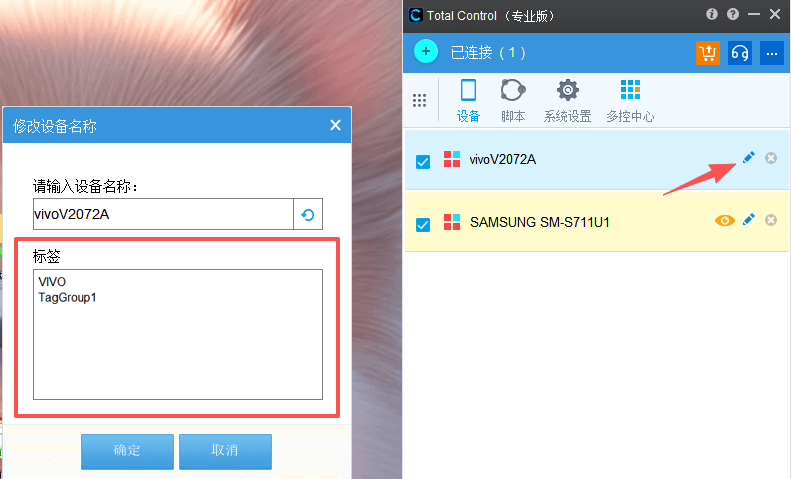
- 将示例代码保存为一个 .js 文件(如 TestTag.js),并放置到 Total Control 默认脚本目录 中
- 打开脚本终端(主面板 → 脚本 → 脚本终端),执行:
>> sigmaLoad("TestTag.js");
//引入search对象
var search = require('sigma/device');
//判断是否引入成功
if (search) {
	//调用search对象中的searchTag方法,参数为字符串,可搜索单个标签
	var searchdevice = search.searchTag('TagGroup1');
	if (searchdevice ) {
		//搜索成功,打印searchdevice对象
		print('find device :' + searchdevice );
		//使用searchdevice对象运行启动App命令
		if (searchdevice.length == 1) {
			var result = searchdevice[0].runApp('com.sigma_rt.sigmatestapp');
			if (result == 0) {
				delay(1000);
				//使用searchdevice对象运行sendAai命令
				var aaiResult = searchdevice[0].sendAai({action:"click", query:"T:CHECKBOX"});
				print('click checkBox :' + aaiResult);
			} else {
				print('run app failed : ' + lastError());
			}
		} else {
			var result = searchdevice.runApp('com.sigma_rt.sigmatestapp');
			print('runapp :' + result.success());
			if (result.success()) {
				delay(1000);
				//使用searchdevice对象运行sendAai命令
				var aaiResult = searchdevice.sendAai({action:"click", query:"T:CHECKBOX"});
				print('click checkBox :' + aaiResult.success());
				if (!aaiResult.success()) {
					print(aaiResult.errors())
				}
			} else {
				print(result.errors())
			}
		}
	} else {
		print('No device found.');
	}
} else {
	print('load sigma/device error.');
}
运行结果
find device :device@251745906,device@761360159
runapp :true
click checkBox :true