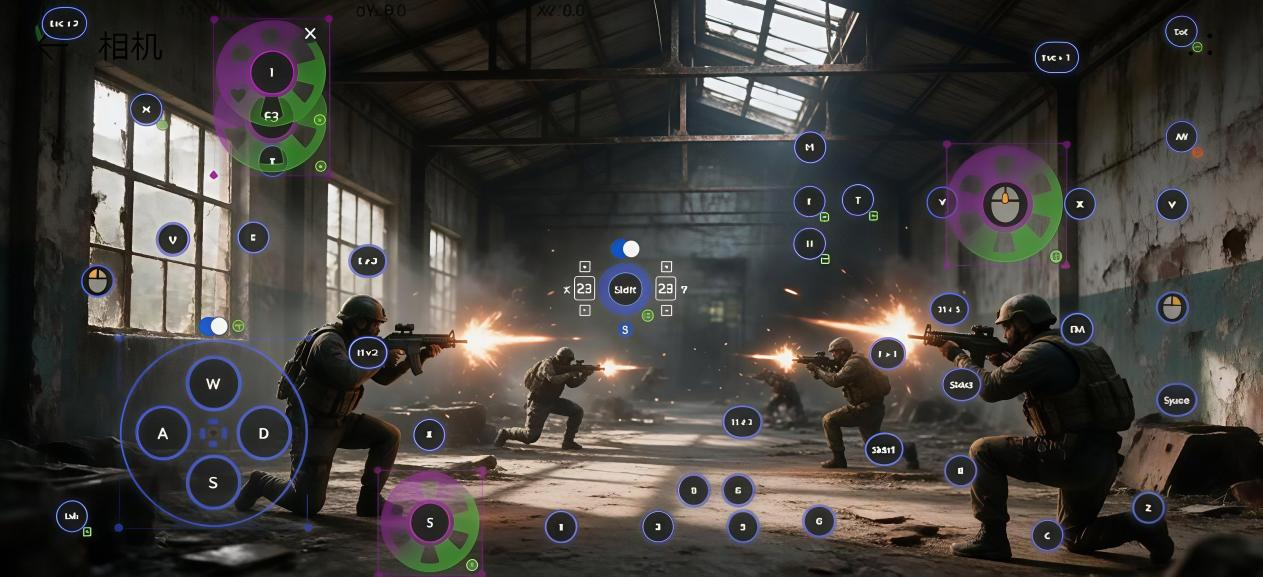
Keyboard and mouse control is a core highlight of TC Games. While many users simply apply default key presets, they often overlook advanced features like custom keybinds and macros—tools that can significantly elevate your gameplay experience. This guide provides a complete breakdown of these key-mapping functions.
One-Click Preset Import: Effortless Setup for Beginners
The software includes official key presets for a wide range of popular mobile games, spanning genres such as MOBA, shooters, card games, and strategy. Once in-game, simply open the key-mapping panel and select the preset designed for your specific title. Controls for movement, aiming, and firing are pre-configured, allowing you to jump straight into the action—perfect for those new to playing mobile games with a keyboard and mouse, as it eliminates the need for manual setup. The free version supports essential functions like movement, clicking, and firing.
Custom Key Layouts: Tailor Controls to Your Personal Style
Since default presets may not suit everyone’s preferences, you can freely add, reposition, or remove keys. The software supports features like directional swiping, camera-following, virtual crosshairs, right-click camera locking, and smart-casting. For shooters, you can map actions like aiming down sights (ADS), crouching/proning, and reloading to keys that feel most natural to you. In MOBA games, you can adjust skill key placements or set up “cancel-cast” options to prevent accidental skill activation. Every key can be individually resized and its trigger area adjusted to accommodate different hand sizes and playstyles.
VIP Macro Functions: Execute Complex Combos with a Single Key
Macros are an advanced feature that allow you to record a sequence of actions—enabling you to trigger complex combos, rapid-fire clicks, or multi-step swipes with just one press. Whether it’s collecting resources in a strategy game or executing a multi-skill combo in a competitive title, macros drastically simplify repetitive tasks. You can even set specific time intervals between actions to maintain precise timing. When combined with camera-swiping features, this makes movement and field-of-view adjustments feel incredibly fluid.
Save and Import Key Layouts: Seamless Reuse Across Accounts
Once you’ve fine-tuned your key layout, you can save it as a configuration file. This allows you to quickly import your settings when switching accounts or playing similar games, saving you the trouble of reconfiguring everything from scratch. You can also back up your key bindings, allowing you to load them instantly whenever you switch to a different computer.
Mastering this approach to key mapping goes beyond basic mouse and keyboard clicks; it lets you reconstruct your control logic to suit your personal habits. Whether you’re playing casually or competing in intense matches, your overall handling will feel significantly smoother.